ポケモンGO 進化計算機
ポケモンを選び、現在のCPとゲーム内の個体値バーを入力して「計算」を押すと、レベルを推定して進化後のCPとHPを表示します。
データベースにこのポケモンの進化先は登録されていません。
友達とシェア:

Wynaut
CP
HP
| LV | こうげき | ぼうぎょ | Stamina | IV% |
|---|


| RANK | LV | CP | IV |
|---|---|---|---|
|
1
|
50 | 1260 | 15/15/15 |
|
2
|
50 | 1251 | 14/15/15 |
|
3
|
50 | 1255 | 15/14/15 |
|
04
|
50 | 1256 | 15/15/14 |
|
05
|
50 | 1241 | 13/15/15 |
|
06
|
50 | 1246 | 14/14/15 |
|
07
|
50 | 1246 | 14/15/14 |
|
08
|
50 | 1250 | 15/13/15 |
|
09
|
50 | 1251 | 15/14/14 |
|
10
|
50 | 1251 | 15/15/13 |
|
11
|
50 | 1232 | 12/15/15 |
|
12
|
50 | 1236 | 13/14/15 |
|
13
|
50 | 1237 | 13/15/14 |
|
14
|
50 | 1241 | 14/13/15 |
|
15
|
50 | 1241 | 14/14/14 |
|
16
|
50 | 1245 | 15/12/15 |
|
17
|
50 | 1242 | 14/15/13 |
|
18
|
50 | 1246 | 15/13/14 |
|
19
|
50 | 1246 | 15/14/13 |
|
20
|
50 | 1247 | 15/15/12 |
|
21
|
50 | 1222 | 11/15/15 |
|
22
|
50 | 1227 | 12/14/15 |
|
23
|
50 | 1231 | 13/13/15 |
|
24
|
50 | 1227 | 12/15/14 |
|
25
|
50 | 1232 | 13/14/14 |
|
26
|
50 | 1236 | 14/12/15 |
|
27
|
50 | 1236 | 14/13/14 |
|
28
|
50 | 1232 | 13/15/13 |
|
29
|
50 | 1240 | 15/11/15 |
|
30
|
50 | 1237 | 14/14/13 |
| RANK | LV | CP | IV |
|---|---|---|---|
|
1
|
50 | 1260 | 15/15/15 |
|
2
|
50 | 1251 | 14/15/15 |
|
3
|
50 | 1255 | 15/14/15 |
|
04
|
50 | 1256 | 15/15/14 |
|
05
|
50 | 1241 | 13/15/15 |
|
06
|
50 | 1246 | 14/14/15 |
|
07
|
50 | 1246 | 14/15/14 |
|
08
|
50 | 1250 | 15/13/15 |
|
09
|
50 | 1251 | 15/14/14 |
|
10
|
50 | 1251 | 15/15/13 |
|
11
|
50 | 1232 | 12/15/15 |
|
12
|
50 | 1236 | 13/14/15 |
|
13
|
50 | 1237 | 13/15/14 |
|
14
|
50 | 1241 | 14/13/15 |
|
15
|
50 | 1241 | 14/14/14 |
|
16
|
50 | 1245 | 15/12/15 |
|
17
|
50 | 1242 | 14/15/13 |
|
18
|
50 | 1246 | 15/13/14 |
|
19
|
50 | 1246 | 15/14/13 |
|
20
|
50 | 1247 | 15/15/12 |
|
21
|
50 | 1222 | 11/15/15 |
|
22
|
50 | 1227 | 12/14/15 |
|
23
|
50 | 1231 | 13/13/15 |
|
24
|
50 | 1227 | 12/15/14 |
|
25
|
50 | 1232 | 13/14/14 |
|
26
|
50 | 1236 | 14/12/15 |
|
27
|
50 | 1236 | 14/13/14 |
|
28
|
50 | 1232 | 13/15/13 |
|
29
|
50 | 1240 | 15/11/15 |
|
30
|
50 | 1237 | 14/14/13 |
| RANK | LV | CP | IV |
|---|---|---|---|
|
1
|
18 | 500 | 0/11/15 |
|
2
|
18 | 500 | 0/12/14 |
|
3
|
18 | 499 | 0/15/10 |
|
04
|
18 | 500 | 1/9/15 |
|
05
|
18 | 498 | 0/10/15 |
|
06
|
18 | 499 | 0/13/12 |
|
07
|
18 | 500 | 1/15/8 |
|
08
|
17.5 | 499 | 2/14/14 |
|
09
|
18 | 498 | 0/11/14 |
|
10
|
17.5 | 497 | 1/15/14 |
|
11
|
17.5 | 498 | 1/15/15 |
|
12
|
18 | 500 | 1/13/10 |
|
13
|
18 | 497 | 0/14/10 |
|
14
|
18 | 499 | 0/14/11 |
|
15
|
18.5 | 500 | 0/6/13 |
|
16
|
18 | 498 | 1/8/15 |
|
17
|
17.5 | 499 | 3/14/12 |
|
18
|
18 | 496 | 0/9/15 |
|
19
|
18 | 500 | 2/7/15 |
|
20
|
18 | 499 | 1/11/12 |
|
21
|
17.5 | 497 | 2/15/12 |
|
22
|
17.5 | 499 | 2/15/13 |
|
23
|
18 | 497 | 0/12/12 |
|
24
|
18 | 499 | 0/12/13 |
|
25
|
18.5 | 500 | 0/15/3 |
|
26
|
18 | 500 | 2/13/8 |
|
27
|
18 | 498 | 1/14/8 |
|
28
|
18 | 500 | 1/14/9 |
|
29
|
18.5 | 500 | 0/7/12 |
|
30
|
18 | 496 | 0/15/8 |
このポケモンGO進化計算機で何ができる?
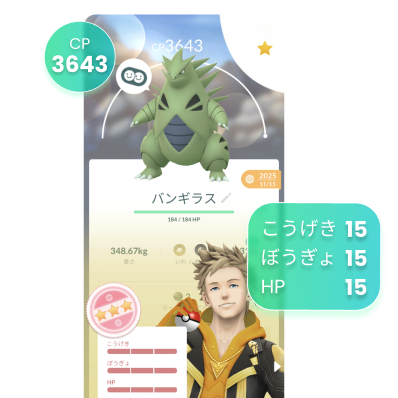
現在のCPとゲーム内の個体値バー(こうげき・ぼうぎょ・HP)を入力してください。
レベルを推定し、同じレベルでの進化後CPとHPを表示するので、進化前に強化するか判断しやすくなります。
使い方:PoKeep ポケモンGO 進化計算機
種族を選び、個体値バーを合わせ、CPを入力すると、プレビューで進化前後のステータスを確認できます。
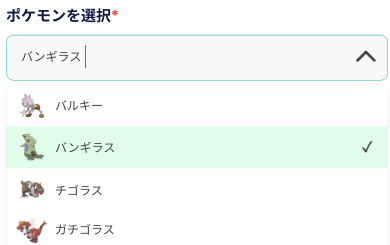
ステップ 1. 進化させるポケモンを選びます(例:ヒトカゲ)。
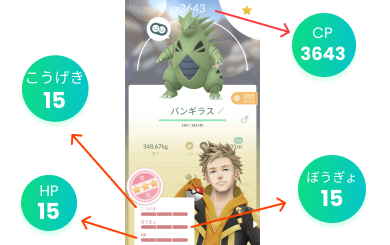
ステップ 2. 現在のCPを入力し、こうげき・ぼうぎょ・HPの個体値バーをゲーム内と一致させます。
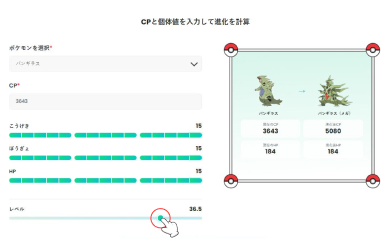
ステップ 3. 「計算」を押した後、レベルをスライドして進化後のCPとHPを確認します。
ポケモンGO進化計算機のよくある質問
進化計算機の仕組みは?
各ポケモンの種族値とポケモンGOのCP計算式を使い、入力したCPと個体値バーから一致するレベルを求めます。進化しても個体値は変わらないため、同じレベルと個体値を進化後の種族に当てはめ、進化後のCPとHPを推定します。
なぜ個体値バーを入力する必要がある?
進化後CP and HP depend on your Pokémon's IVs and level. Matching the in-game appraisal bars (0–15 for こうげき, ぼうぎょ, and HP) gives a much more accurate evolved CP estimate than guessing. If the bars do not match your Pokémon, the inferred level and results may be wrong.
計算後のレベルスライダーは何に使う?
The レベル slider appears only after a successful calculation. It starts at the level inferred from your CP and IVs. Moving the slider updates current CP, evolved CP, and both HP values for that level while keeping your IVs unchanged—useful if you are deciding whether to power up before evolving.
どのポケモンを計算できる?
You can calculate any species that has a standard or Mega evolution in our database. If a Pokémon has no evolution path, you will see a message when you try to calculate. Pokémon with multiple Mega forms (such as リザードンやミュウツー)はリストの最初のメガ形態(XがYより優先)を使用します。
この進化計算機は安全?
安全です。手動のWeb計算機で、ポケモンGOへのログインは不要です。ゲーム外で動作するため、アカウント情報にアクセスせず、このページの利用だけでBANされることはありません。